Users accounts are used to provide access to the platform and are broadly divided into two categories: Platform Users and Mobile Users.
Platform Users have access to the web-based platform. This user type is typically assigned to administrators, event managers, or internal team members who require full or partial control over the platform’s features and settings.
Mobile Users primarily interact with the platform through the mobile application. They are generally end users, guests, or participants who only need access to relevant content and features within the app.
How To invite a Platform User
Inviting a Platform User is the most commonly used option when granting backend access.
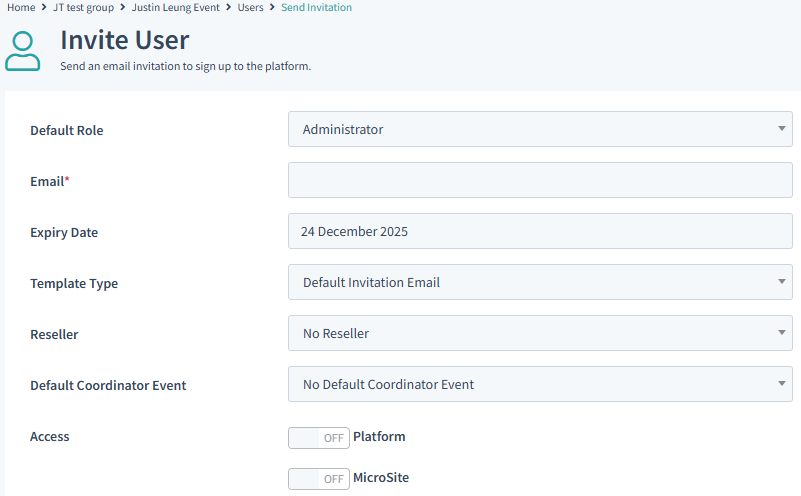
>Start by selecting - System Settings > Users > the Actions dropdown has all the options you need.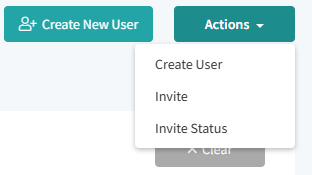 > Select Invite > the page below from the image will show. Choose the Default Role for the person then add there Email.
> The access Level will be Platform
> Select Send invitation once you are happy with the configuration.
The person will receive an email with instructions to create there account on the platform.
The Create New User option is used when a Platform User wants to pre-enter the user’s details, rather than having the new user complete the information themselves.
Note: Mobile users get created automatically when a guest is sent an invite to an event and they fill a registration form.
The option Invite status is used to monitor the invites sent such as whether the invite was accepted or if the invite has expired.
Was this article helpful?
That’s Great!
Thank you for your feedback
Sorry! We couldn't be helpful
Thank you for your feedback
Feedback sent
We appreciate your effort and will try to fix the article